The IntelliSee platform

See what matters.Act with confidence.

Turn the cameras you already have into a clearer view of risk.
IntelliSee brings AI detection, useful context, and your response together.

AI safety software. Built around your people, spaces, and operations.

SEE INTELLISEE AT WORKOne camera. A moment that matters.
01 Camera to context
0:00 / 0:08

02 The detection
WEAPON DETECTED

The moment,
identified.

The corresponding detection image brings the visible weapon into focus.

Explore weapon detection

A person crosses an outdoor lot with a visible weapon. The matching detection image appears, then zooms toward the weapon box. Stitched frames · No audio.

Works with existing camerasVideo analyzed on siteNo facial recognition

Your cameras can do more

One platform.
More ways to care.

Explore actual detections across everyday safety, security, and operational risks. The cameras stay familiar. Your awareness grows.

See what needs attention.

Turn compatible camera feeds into awareness of the risks that matter in your spaces.

Understand the moment.

Bring the detection, image, and location together so your team has useful context.

Get your people moving.

Connect alerts to the people and response tools you’ve chosen for your organization.

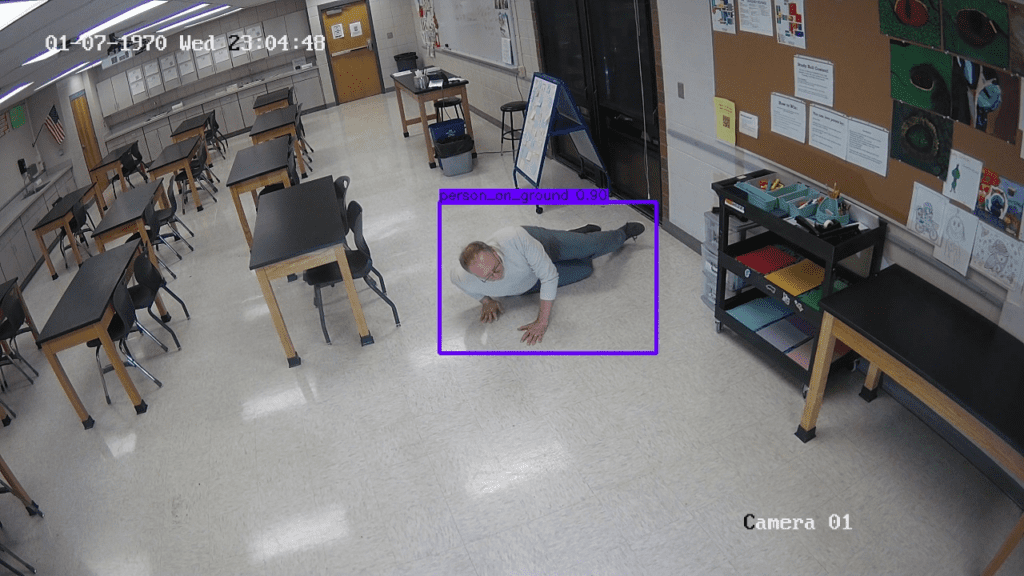
Person-down detection · Entryway camera

Safety / Fall detection

Be there when someone needs help.

A person down in a camera-covered space can need attention quickly. Give your team a clear place to start, even when no one is watching that screen.

Explore this solution
Explore all detection solutions

Real detection captures. Select a category, then open the image for a closer look.

Awareness, connected to action

The right context.
In the right hands.

Your team already has a way to respond. IntelliSee helps bring the moment on camera into that workflow, with the details people need to decide what to do next.

See how it works
01

A risk comes into view.

AI analyzes compatible camera feeds on your network.

02

The details come together.

An event image, detection type, timestamp, and camera location provide context.

03

Your response takes it from here.

Configured alerts reach your team and supported notification or emergency workflows.

Connect with your
response ecosystem.

Emergency workflowsInformaCast notificationsCommunicationsYour teamEmail & mobile alerts

Made for your world

Made for your spaces.
Built around your team.

Find your solution

Real detection captures shown for context. Coverage is configured for each organization.

Customer story / 27J Schools

Four campuses.
A familiar camera network.

See how a Colorado school district brought AI weapon detection to four high school campuses using its existing cameras.

Meet 27J Schools
4high school
campuses covered
0new cameras
required

From the published 27J Schools deployment story. Camera and deployment requirements vary by organization.

Customer story / Big Ten stadium

More from the cameras
already in place.

Read the stadium story
$115Kreported first-year savings

A documented deployment connected 127 existing cameras and changed its event monitoring operation. Results reflect that deployment.

Inside IntelliSeePlatform operations
Actual IntelliSee interface · Platform administration view

Fits the way you operate

Software your team
can put to work.

From camera coverage to configuration and support, see how the IntelliSee platform brings the operational details together. We’ll help you plan a fit for the infrastructure you already own.

  • Compatible ONVIF and RTSP camera feeds
  • Video analysis on an on-premises appliance
  • Detection settings shaped around your spaces
  • Alert paths configured for your team
Talk through your setup

A few things you might be wondering.

More answers
Do we need to replace our cameras?

IntelliSee works with compatible ONVIF and RTSP camera feeds. Your team’s walkthrough will confirm camera views, lighting, network access, and appliance requirements before a rollout is scoped.

Is this cloud software or an on-site system?

Video analysis runs locally on an IntelliSee appliance. The software brings detection, event review, and configured alert workflows together. Event images and other alert details can be shared with designated recipients or integrations.

Does IntelliSee identify individual people?

IntelliSee detects events and objects without facial recognition. Camera views, alert recipients, and data handling should be reviewed as part of your organization’s deployment.

What does a demo cover?

We’ll walk through the software, discuss the spaces and risks you care about, and review how your cameras and response processes could fit. Deployment scope and commercial terms are discussed for your organization.

Let’s see what’s possible

A clearer view.
A more confident team.

See the software in action. Then talk through what it could look like for your people, your spaces, and your cameras.

Your cameras. Your priorities. A walkthrough built around you.

IntelliSee / Platform operations

Expanded IntelliSee platform administration view

A real platform administration screen. Available views depend on role and account access.

Original detection image

Original capture · Shown in fullOpen original